
git and GitHub Workflow#
The best method for contributing software to the repository is a workflow that involves forking the repository, developing changes on “feature” branches, and opening pull requests through GitHub.
The following diagram depicts this workflow:
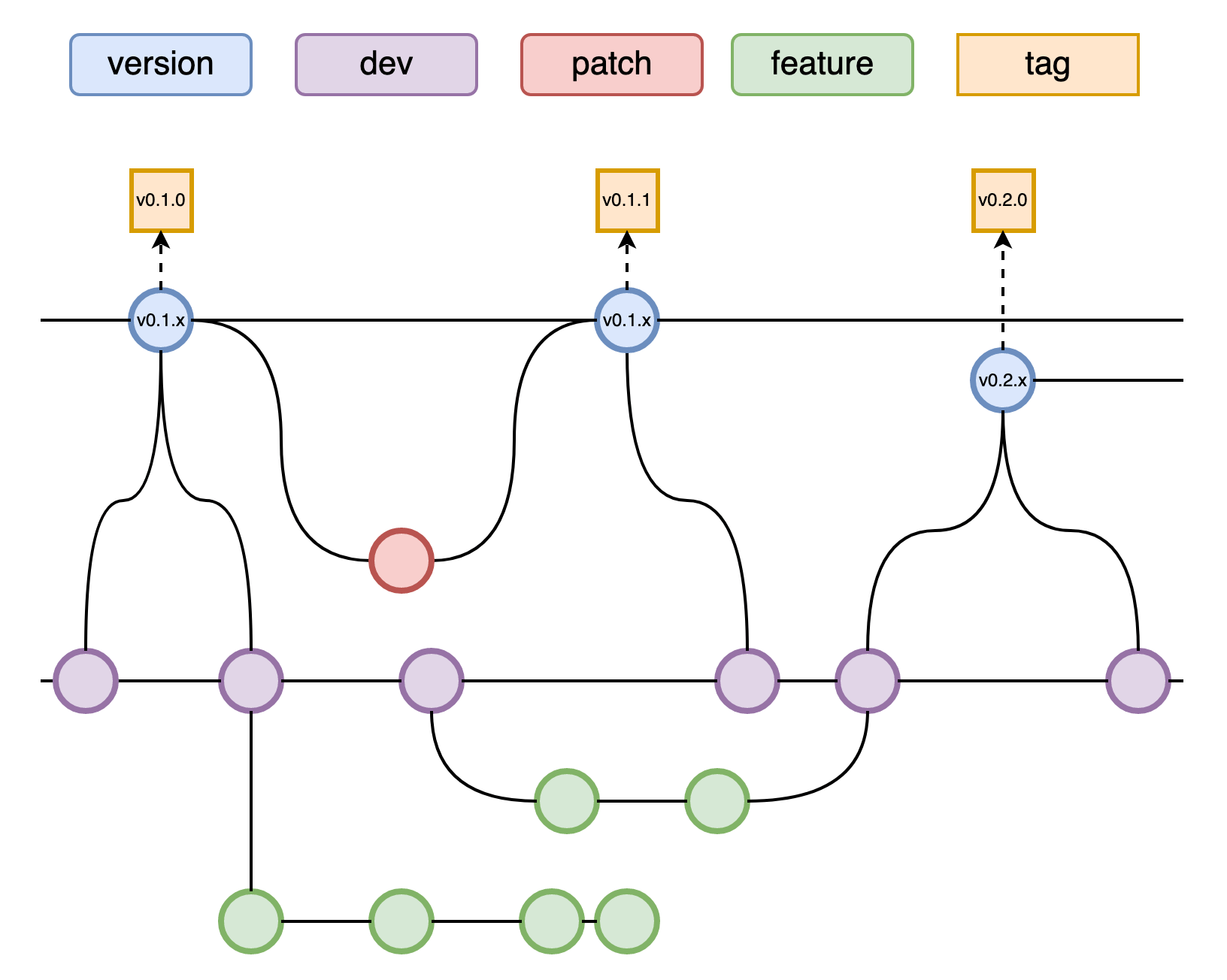
As such, all feature branches should be branched off of and merged back into the dev branch.
Contributing new features#
Before contributing, it is generally encouraged to open a GitHub issue (imap_processing, or sds-data-manager), if one does not already exist, that describes the feature to be implemented, or the problem that is trying to be solved. This allows the contributor and the team as a whole to keep track of how the feature relates to the project and track its progress. Any contributors to the feature should be assigned to the issue, and proper label(s) should also be assigned.
Note: We use the ‘imap_processing’ repository as an example here, but this can be applied to ‘sds-data-manager’ as well.
Note: Steps (1) through (5) only to be completed once.
Create a personal fork of the
imap_processingrepository by visiting the mainIMAP-Science-Operations-Centerimap_processingrepository and clicking theForkbutton near the top-right of the page. Follow the various steps to create a fork under your GitHub account.Make a local copy of your personal fork by cloning the repository, using the URL found by clicking the green “clone” button:
git clone https://github.com/<username>/imap_processing.git  # for HTTPS
git clone git@github.com:<username>/imap_processing.git  # for SSH
Ensure that the personal fork is pointing to the
upstreamimap_processingrepository:git remote add upstream https://github.com/IMAP-Science-Operations-Center/imap_processing.git # for HTTPS git remote add upstream git@github.com:IMAP-Science-Operations-Center/imap_processing.git # for SSH
Install the development dependencies and pre-commit hooks. These hooks will automatically run the ruff formatter and linter on your code changes before commits:
pip install .[dev]
pre-commit install
Retrieve the
upstreamdevbranch:git fetch upstream git checkout -b dev upstream/dev
Create a feature branch off of the
devbranch to develop changes on. Branch names should be short but descriptive (e.g.update-codice-unit-tests) and not too generic (e.g.bug-fix,updates). Consistent use of hyphens is encouraged.git checkout -b <branchname>
Make changes to the branch using the nominal
git add/git commitcycle.git add <new or changed files you want to commit> git commit -m 'Explanation of the changes'
With the pre-commit hooks installed, you may need to make fixes to any warnings/errors reported by
ruffand try committing your changes again.Push the feature branch to your personal fork’s GitHub repository:
git push origin <branchname>
On the
IMAP-Science-Operations-Centerimap_processingrepository create a new pull request. Click on the “compare across forks” link to enable the pull request to use your fork. Set the “base repository” toIMAP-Science-Operations-Centerand “base” todev. Set the “head repository” to theimap_processingrepository under your personal fork and “compare” to your feature branch. If the feature branch is still under development, you can click the “Convert to draft” button under the “Reviewers” section, or add a “[WIP]” at the beginning of the pull request title to signify that the pull request is not ready to be merged.- Assign at least one reviewer to the pull request, though two or more reviewers are highly encouraged, especially for
significant changes. They will review your pull request and either accept the request or ask for additional changes. If additional changes are needed, iterate through steps (7) and (8) until you and the reviewer(s) are satisfied.
Once the pull request has been accepted, you can merge the pull request and delete the feature branch.
Keeping your fork updated#
You can keep your personal fork up-to-date with the IMAP-Science-Operations-Center imap_processing repository by
either fetching and rebasing with the upstream remote, or fetching and pulling with the upstream remote:
git checkout dev
git fetch upstream
git rebase -i upstream/dev
or
git fetch upstream dev
git pull upstream/dev
Collaborating on someone else’s fork#
To contribute to a branch on another person’s personal fork, add a new remote that points to their fork, and use the
nominal workflow for contributing:
git remote add <username> <remote url>
git fetch <username>
git checkout -b <branchname> <username>/<branchname>
# Make some changes via add/commit cycle
git push <username> <branchname>